The Driving For Dollars App
Driving For Dollars App LLCBusiness
2.844.00 Reviews
- Version
- 2.1.2
- Installs
- 10.00K
- Age Rating
- Everyone
Screenshots
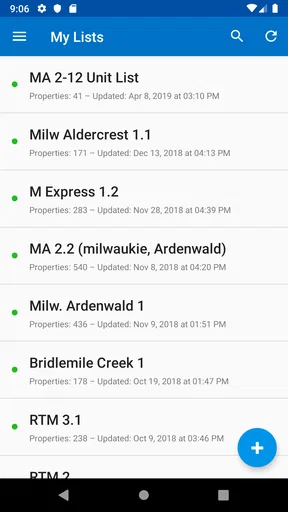
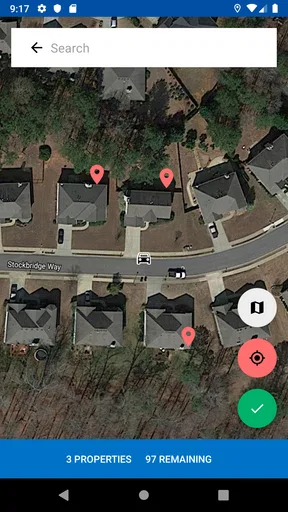
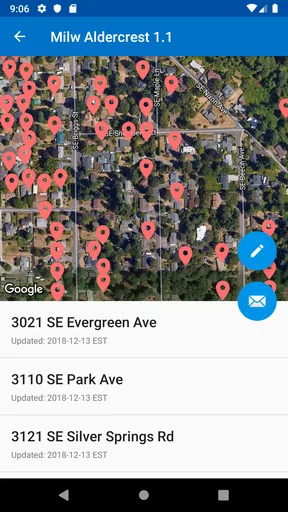
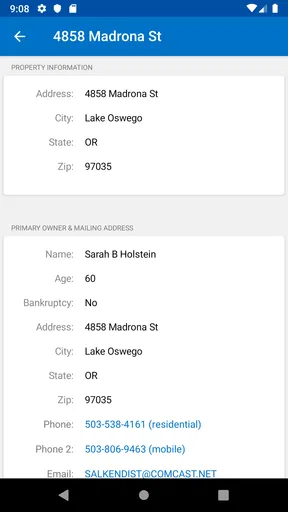
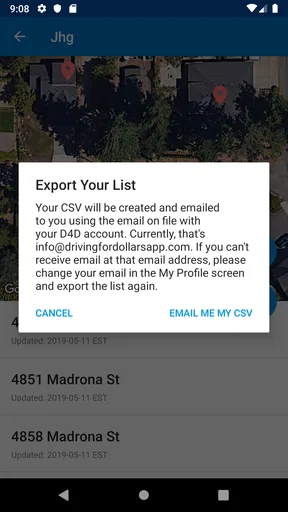
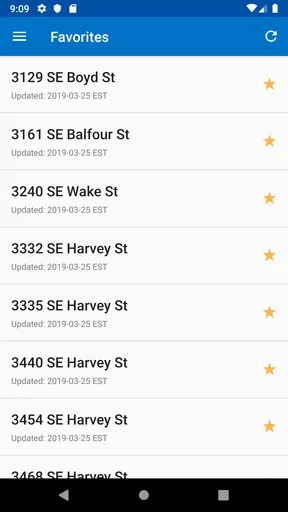
Our Review of The Driving For Dollars App
 Analysis by Appyee
Driving For Dollars App is a business tool for people who look for real-estate opportunities while moving through local neighborhoods. I approached it less like a magic lead generator and more like a field notebook for a repeatable scouting habit. That distinction matters: the app can support the work of noticing properties, recording prospects, and following up, but it does not remove the judgment, research, or patience that real-estate prospecting requires.
The app is free to install and is aimed at Everyone, although its practical audience is much narrower than that age label suggests. It comes from Driving For Dollars App LLC and sits in the business category. The current release is version 2.1.2, and it runs on Android devices using Android 6.0 or later. Its store presence is modest, with over ten thousand installs, an average rating of 2.8 from around sixty-five ratings, and roughly forty-four written reviews. Those figures suggest an app with a specific audience and a mixed user experience rather than a polished mainstream productivity product.
Building a useful property-scouting workflow
I find the most useful way to approach neighborhood scouting is to set a clear purpose before I begin: what signs am I looking for, and what would make an address worth researching afterward? That simple preparation helps turn casual driving into a manageable routine and keeps the next step focused on evidence, not hunches. Once that groundwork is in place, I can make better use of each outing.
What to do before opening the app
The most important part of using this tool happens before I start driving. If I simply open it and wander around, I create a pile of interesting addresses without a clear next step. The better approach is to decide what I am looking for first: neglected exterior condition, long-term vacancy signals, a particular property type, or streets that fit a defined investment area. The app becomes much more useful when every captured property has a reason for being captured.
I would also prepare a simple screening rule. For example, I might record only houses showing visible maintenance problems, properties that appear unoccupied, or buildings in an area where I already understand local prices. This prevents the common mistake of treating every unusual-looking home as a promising lead. A worn fence may indicate opportunity, but it may also reflect a perfectly occupied property whose owner has no interest in selling.
That is where the app’s “driving for dollars” concept makes sense. Instead of waiting for a listing to appear on a property website, I can observe the physical condition of an area directly. The trade-off is that field observation is slower and more subjective than searching a database. I have to interpret what I see, respect private property, and accept that an initial observation is only a starting point.
Capturing observations while moving through an area
In a realistic afternoon routine, I would choose a small group of streets, park safely, and use the app as I move from one block to the next. The goal is not to operate the phone continuously while driving. That would be distracting and unsafe. Instead, I would stop before recording a property, make a quick note about why it caught my attention, and continue only after the phone is secured.
This stop-and-record habit is more valuable than trying to collect a huge number of addresses. A smaller set of carefully observed prospects is easier to research later. I would note visible details such as overgrown landscaping, boarded openings, exterior repair needs, or signs that the property may be vacant. I would avoid writing conclusions as if they were facts. “Possible vacancy” is a better working note than “vacant,” because the second statement can lead to careless assumptions during outreach.
A useful, less obvious discipline is to separate observation from qualification. The app can help me preserve the location of something worth checking, but it should not become the place where I make a final investment decision on the roadside. That decision belongs in a later review session, when I can compare public records, ownership information, neighborhood conditions, and likely repair costs.
Turning scattered leads into a repeatable system
The strongest use case is not a single weekend drive. It is a cycle: choose an area, scout it carefully, review the captured properties, research the strongest candidates, contact people appropriately, and then record what happened. Without that cycle, the app risks becoming a digital drawer full of forgotten addresses.
I would create a regular review block after each scouting session. During that review, I would remove duplicates, discard properties that clearly do not fit my criteria, and rank the remaining ones by the quality of the evidence. A property with several consistent signs deserves more attention than one based on a single visual impression. This is also the point where I would add context from other legitimate research tools rather than relying on the app alone.
The direct-mail angle makes follow-through especially important. If I decide to contact an owner, I need a process for tracking when the contact was prepared, what information was used, and whether a response arrived. The app may be the field-capture part of that process, but it should not be mistaken for a complete customer relationship system. I would keep a separate, organized follow-up method if my activity grows beyond occasional personal prospecting.
How it compares with ordinary real-estate searches
Property-listing websites are better when I already know the address, neighborhood, price range, or listing status I want to search. They provide a more conventional research experience and are usually more suitable for comparing active listings. Driving For Dollars App serves a different purpose: it begins with what I notice on the street rather than what has already been published online.
That difference can uncover a kind of lead that a standard search may not surface immediately, especially when a property is not actively marketed. However, the app cannot replace listing databases, public-record research, mapping tools, or careful financial analysis. It is best viewed as the first capture point in a broader workflow. If I want instant valuations, comprehensive ownership records, or a ready-made pipeline, I would look for a more specialized real-estate platform instead.
Practical organization that prevents lead overload
My preferred approach would be to use three simple stages: captured, researched, and ready for follow-up. Even if the app’s own organization tools feel sufficient for basic use, thinking in these stages helps me avoid mixing raw observations with verified prospects. Each stage answers a different question. Captured asks, “What did I notice?” Researched asks, “Does this deserve attention?” Ready for follow-up asks, “What is my next responsible action?”
One useful trick is to record the reason for rejection as well as the reason for keeping a property. A discarded lead may look attractive again months later, and without a short explanation I may repeat the same work. Another is to revisit the area at a different time before treating a vacancy impression as meaningful. A quiet house during one pass does not prove that nobody lives there.
I would also avoid collecting personal information casually. The app’s value is in identifying properties and organizing business research, not in encouraging intrusive behavior. Any outreach should be lawful, respectful, and clearly connected to a legitimate real-estate purpose. Sustainable productivity includes knowing when not to pursue a lead.
Where the experience can become frustrating
The mixed rating is worth taking seriously. A 2.8 average indicates that not every user finds the experience smooth or dependable. I would approach the app with modest expectations, particularly if I need a highly polished interface or a system that handles every stage of prospecting. A free download lowers the barrier to testing it, but it does not guarantee that it will fit every device, working style, or local market.
There is also a practical cost beyond the download. Field scouting uses time, travel, attention, and later research. If I drive without a clear route or screening rule, the app can make an inefficient process feel more organized without actually improving it. That is a dangerous kind of productivity: more records, but not better decisions.
The presence of in-app purchases ranging from about twenty dollars to around four hundred dollars per item makes budgeting important. I would not purchase anything immediately. First, I would test whether the basic workflow helps me capture and review leads consistently. Only after understanding what an optional purchase adds would I consider spending money. For a casual user, those possible costs may outweigh the benefit; for an active investor, they should be judged against time saved and the quality of the resulting follow-up.
Questions I would ask before relying on it
Can a beginner use it? Yes, as a starting point, provided the beginner understands that recording a property is not the same as finding a deal. I would begin with a small neighborhood and a short list of visual criteria. That makes it easier to learn the process without turning the first outing into an unmanageable research project.
Is it useful without buying anything? The app is free to install, so testing the basic experience is straightforward. I would use that opportunity to evaluate the complete path from spotting a property to organizing the next action. If the free experience does not fit that routine, paying for extras is unlikely to solve the underlying workflow problem.
Does it replace a real-estate database? No. I would use it for field discovery and then verify important details elsewhere. Ownership, property history, liens, zoning, market value, and repair economics require appropriate research sources. Treating a visual note as a complete lead would be a serious mistake.
Is it suitable for a professional team? It may help an individual or a small operation experiment with neighborhood scouting, but I would be cautious before making it the central system for a larger team. Shared standards, duplicate prevention, contact history, permissions, and reporting become increasingly important as more people collect leads. A dedicated real-estate CRM may be a better choice when collaboration is the main requirement.
What should I do if a property looks distressed? I would document only what can be observed from a lawful public position, avoid trespassing, and phrase the note carefully. Then I would research the property through legitimate channels and use respectful outreach if it remains appropriate. The app can support that sequence, but it cannot make an uncertain observation certain.
Who should adopt this kind of tool
I see the best fit in an investor, wholesaler, agent, or motivated researcher who already has a defined area and is willing to do follow-up work. It can also suit someone who prefers discovering neighborhoods in person rather than relying entirely on online listings. The app’s greatest value is likely to appear when the user enjoys the scouting process and can turn observations into a disciplined pipeline.
I would skip it if I only want instant property valuations, automated recommendations, or a polished all-in-one business platform. I would also skip it if I am not prepared to spend time researching and organizing what I capture. In that situation, the app may encourage collecting more leads than I can responsibly handle.
For me, the deciding question is simple: will this become part of a weekly routine? If I can define an area, scout safely, review the results, and follow up consistently, the app has a practical role. If I am downloading it because the idea of finding hidden opportunities sounds exciting but have no process afterward, it will probably add clutter rather than progress.
My final view after fitting it into a routine
I would describe Driving For Dollars App as a focused field-scouting aid rather than a complete real-estate business platform. Its free entry point makes experimentation reasonable, and its purpose is clear: help turn neighborhood observation into organized prospecting. The useful insight is not that every distressed-looking property is valuable; it is that consistent observation can create a different starting point for research than ordinary listing searches.
At the same time, the modest rating, possible in-app spending, and need for substantial work outside the app keep me from recommending it without qualifications. I would test it on a limited route, use careful notes, review every captured address, and avoid paying until the workflow proves useful. The app works best as one dependable step in a sustainable system, not as a shortcut around real-estate judgment.
If that matches how you work, it is worth trying as a practical experiment. If you need advanced records, team coordination, automated analysis, or a ready-to-use follow-up pipeline, a more comprehensive real-estate tool will probably serve you better. My recommendation is therefore measured: adopt it for disciplined local scouting, keep expectations realistic, and let the quality of your research—not the number of captured properties—decide whether it earns a permanent place in your routine.
Verdict
Strengths of The Driving For Dollars App
- Helps organize property leads while driving through unfamiliar neighborhoods.
- GPS mapping makes it easy to save and revisit promising locations.
- Useful for investors who prefer finding off-market opportunities.
- Photo and note features keep property details together in one place.
- Can make scouting more systematic than relying on memory or paper notes.
Limitations of The Driving For Dollars App
- Accuracy depends on current map data and correctly identifying property boundaries.
- Frequent driving and stopping may be impractical in busy or unfamiliar areas.
- Some useful investor features may require a paid subscription.
- Manual property research can still take considerable time after scouting.
- Location tracking and saved property data may raise privacy concerns for some users.
Similar Picks in This Category
View All
LinkedIn: Community & Network
LinkedIn3.8

Zoom Workplace
zoom.com4.1

Microsoft Teams
Microsoft Corporation4.6

Meta Business Suite
Meta Platforms, Inc.4.6

Webex Meetings
Cisco Systems, Inc.4.5

TeamViewer Remote Control
TeamViewer4.4
Frequently Asked Questions
What is the Driving For Dollars app used for?
Driving For Dollars is designed for real estate investors who search for potentially distressed or vacant properties while traveling through neighborhoods. Users can record property locations, add notes and photos, mark homes as possible investment leads, and organize follow-up activities. The app is intended to support property scouting and lead generation, rather than replace professional property research or legal verification.
How does the app help me find potential real estate leads?
The app allows you to identify properties that may show signs of neglect, vacancy, or deferred maintenance while driving or walking through an area. You can save the location, attach observations, and build a list of prospects for later research. However, visual signs alone do not confirm ownership, financial distress, or selling interest, so every lead should be independently verified before contacting an owner or making an offer.
Can I use Driving For Dollars without an internet connection?
Some scouting functions may continue to work when mobile coverage is limited, but the availability of offline maps, synchronization, address details, and other features can depend on the app version and device settings. It is best to open the app and confirm that the required neighborhood data is available before starting a route. Internet access may still be needed to upload records, retrieve property information, or synchronize your account.
Is Driving For Dollars free to download and use?
The app may be available to download at no initial cost, but access to important tools can depend on a subscription, trial plan, in-app purchase, or account package. Pricing and included features may change over time, so review the current store listing and subscription screen before registering. Pay particular attention to renewal terms, billing frequency, cancellation rules, and whether a free trial automatically converts into a paid plan.
Is Driving For Dollars safe and legal to use while scouting properties?
The app itself is a research and organization tool, but safe and lawful use depends on how you operate it. Never interact with the app while driving; pull over safely or have a passenger handle it. Do not enter private property without permission, trespass, or photograph people inappropriately. Follow local traffic, privacy, solicitation, and real estate marketing regulations, and verify all property information through reliable public or professional sources.
